Last updated: November 20, 2026
Budget for peer-to-peer transfer fees by treating them like a small but regular bill, not an emergency. If you move money through a payment app for school pickup, rent help, or splitting shared costs, the fee is part of the cost of getting cash where it needs to go. The trick is to plan for standard bank transfer timing, instant transfer fees, debit card funding costs, and transfer limits before the month starts.
Key takeaways
- Peer-to-peer transfer fees are easiest to handle when they sit in one monthly line item, not in scattered app charges.
- Fast cash-outs cost money more often than standard bank transfers, so decide when speed is worth the fee.
- Debit card funding and instant transfer options can turn a small transfer into a larger cost.
- Transfer limits matter because one large payment may need to be split into 2 or more transfers.
- If you use payment apps for shared costs, the fee plan should follow the transfer method, not the person sending or receiving.
What counts as a peer-to-peer transfer fee?

Peer-to-peer transfer fees are the charges a payment app or linked card may add when you send money, cash out money, or move funds faster. The fee is usually not the same as a regular bank transfer fee, and it can change based on whether you use a debit card, choose instant transfer, or let the money move on the app’s standard timeline.
For a single parent, the hard part is that these charges often show up in small pieces. One $20 transfer may feel harmless, but 3 transfers in a week can cost more than one planned cash-out. That is why this budget line needs its own spot, even if the amount is small and even if the app only charges sometimes.
Peer-to-peer transfer fees matter most when timing is tight. If your account balance is low before a school fee, babysitter payment, or gas run, instant transfer may feel necessary. The better question is not “Can I pay it?” but “Can I pay it without breaking the rest of the week?”
How do I budget for peer-to-peer transfer fees?
You budget for peer-to-peer transfer fees by setting aside a fixed amount for app transfers, then using that amount only for speed charges and cash-out fees. The safest approach is to build the budget around your most common transfer pattern, not the biggest one you hope never happens.
- List your payment app and write down every time you use it in a typical month.
- Mark each transfer type as standard bank transfer, instant transfer, or debit card-funded transfer.
- Count the likely fee events in a 30-day month, including cash-out fees and any fee tied to faster delivery.
- Set one transfer-fee line in your budget and fill it from the first paycheck or deposit.
- Keep a small buffer for a split payment or an extra transfer when a transfer limit gets in the way.
This works best when the budget line is tied to timing, not emotion. If you know a payment app usually becomes costly only when you rush money out, then the line can stay small in quiet months and grow in months with more transfers. A single parent often needs that kind of flexibility because paydays, school costs, and child care bills do not land on the same day.
If you want a simple rule, budget for the transfer method you use most often and treat faster options as exceptions. A bank transfer that takes longer may cost less, while an instant transfer may save time but pull money out of the week’s food or fuel budget. That trade-off is the whole problem in one sentence.
Which transfer method should I plan for first?
You should plan for the most expensive transfer method you might realistically use, then lower the budget if you rarely use it. The comparison below shows why method choice changes the budget even when the dollar amount moved stays the same.
| Transfer method | Usual budget risk | What it helps with | What can cost extra |
|---|---|---|---|
| Standard bank transfer | Lower cash-out pressure | Money can wait until the normal timing | Slower access to funds |
| Instant transfer | Higher fee risk | Fast access when a bill is due now | Instant transfer fee |
| Debit card funding | Medium to high fee risk | Quick send or quick pull from a card | Card-based transfer charges |
| Cash-out to bank | Low to medium fee risk | Moves app balance into your bank | Cash-out fee if speed is chosen |
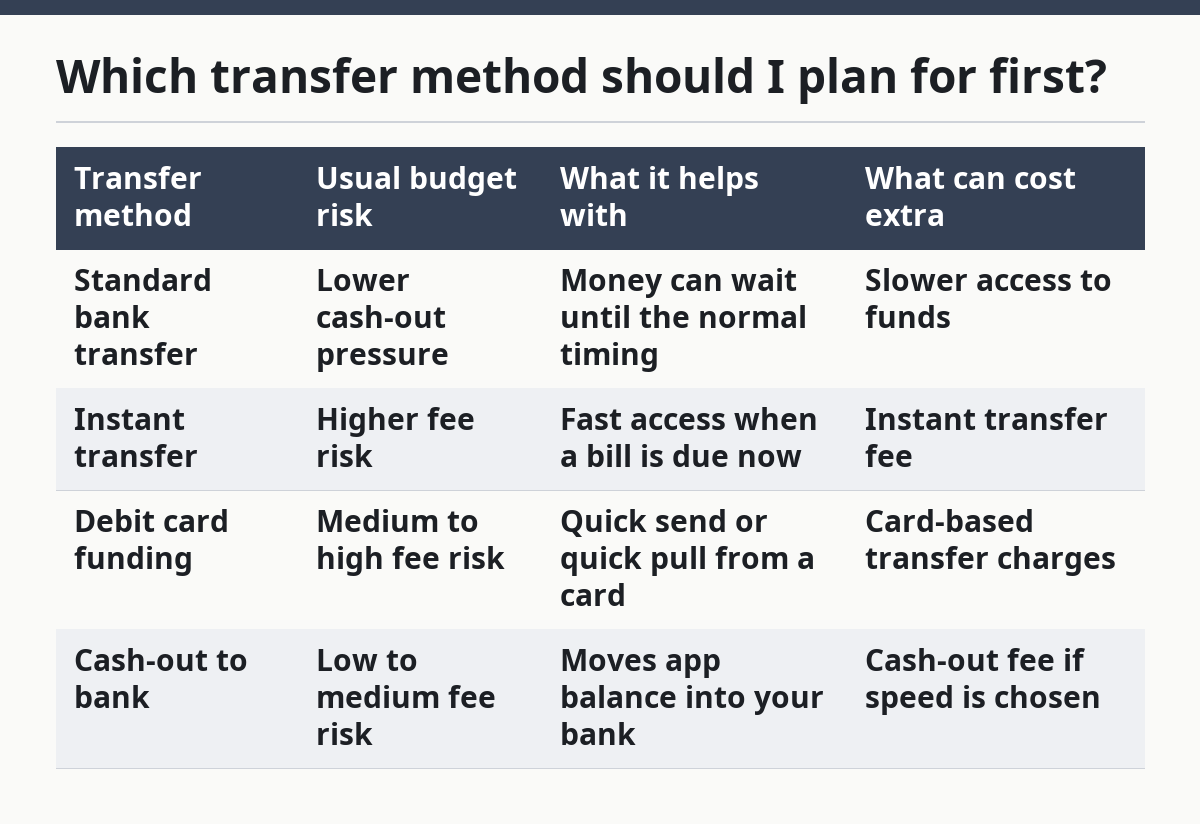
The first method to examine is the one you use when you are short on time. If instant transfer is your backup plan, your budget should assume at least one fast transfer can happen in a busy month. If you almost never need speed, you can keep the transfer-fee line lean and move the difference to savings or groceries.
A common mistake is assuming the cheapest path is always the right one. That is not true when a transfer is tied to a deadline. The better rule is simple: standard timing for planned money, instant transfer only for a true timing problem. That rule keeps the fee line from growing every time the app offers a faster button.
How do transfer limits change my budget?
Transfer limits change your budget because one payment may have to be split into 2 or more transfers, and each transfer can carry its own cost. If a payment app or bank transfer cap is lower than the amount you need to move, the budget needs room for an extra transaction, not just the original payment.
This matters most with rent help, school costs, and shared expenses that do not fit neatly into one app limit. A transfer limit can push you toward a debit card transfer or an instant transfer when you did not plan on it. That can turn one ordinary payment into a fee-bearing chain of events.
The fix is to check the limit before the month begins, then match your budget to that number. If the app limit is 1 transfer and your regular payment is larger, your plan should assume a split. If the limit changes by account type or funding source, use the lowest likely limit so the budget does not break when money is tight.
This is one place where a single parent can get caught by a small detail. A transfer limit is easy to ignore until the day you need money moved quickly. Once that happens, the fee is no longer an abstract app charge; it is the cost of getting through the day.
How should I handle shared costs without overspending?
You should handle shared costs by separating the transfer itself from the person receiving the money. A payment app does not care why the money is moving, but your budget should care whether the transfer is for a child-related split cost, a one-time household expense, or a payment that can wait until standard bank timing.
Start by naming each shared cost in your budget: school supplies, sports fees, child care handoff, or a joint expense that happens once or twice a month. Then decide which of those can use a normal bank transfer and which need an instant transfer. The fewer urgent transfers you make, the lower the total fee load stays.
If the app asks for a debit card and you have the option to use a bank account instead, compare the timing before you decide. A debit card may make the transfer feel easy, but it can also add cost. A bank transfer may take longer, yet it often gives you more room to plan around the fee.
This section is not for people who use a shared expense app to track every split in detail. That is a different budgeting problem and belongs on another page. Here, the goal is simply to keep money moving without letting fast-transfer costs crowd out the rest of the month.
What mistakes make peer-to-peer fees harder to absorb?
The biggest mistake is treating every fee as a surprise instead of a planned expense. That turns a small charge into a budget leak, because the money has to come from somewhere else after the transfer already happened. A second mistake is using instant transfer every time, which can make speed the default even when standard timing would work.
A third mistake is funding transfers with a debit card without checking whether another funding source would cost less. That can be expensive when the app charges for faster movement or card use. A fourth mistake is forgetting transfer limits and then paying for a second transfer when one would have been enough with better planning.
The fix is to review 3 things before each transfer: timing, funding source, and limit. If the payment can wait, use the slower path. If it cannot wait, put the fee in the budget line you already built instead of pulling from groceries or fuel. That one habit keeps the app from hijacking the week.
The same rule applies month after month. A transfer fee is not a moral failure and it is not proof you are bad with money. It is a cost you can plan for, and the plan gets easier when you stop pretending the app will always be cheap.
A broader guide to the rest of these costs sits in the hub on Single-Parent Banking, Payment, and Money Transfer Costs.
Should I budget for peer-to-peer fees every month?
Yes, you should budget for peer-to-peer fees every month if you use a payment app more than a few times a year. The budget line can be small in quiet months, but it should still exist because instant transfer fees, cash-out fees, and transfer limits do not wait for a convenient week.
If your use is rare, a tiny monthly amount is enough to cover the next urgent transfer. If your use is steady, make the line larger and tie it to the number of times you expect to move money in a 30-day month. That is the safer way to handle a fee that shows up in fragments.
A monthly line also makes it easier to compare transfer options. Once the money is already set aside, you can choose standard bank transfer when timing allows and instant transfer only when it truly saves the day. That keeps speed from becoming the default purchase.
What if I only use instant transfer once in a while?
Then budget for the one time it is most likely to happen, not for every day of the month. A single urgent transfer can still hurt if the fee has nowhere to land in the budget. Put a small amount aside and let it sit until the next time you need a fast cash-out.
Should I budget more if I fund transfers with a debit card?
Yes, if debit card funding is common for you, the fee risk is higher than with a bank transfer. A debit card can make a transfer fast, but speed is often the part that costs. Budgeting a little extra for that method keeps the charge from eating into essentials.
What if my transfer limit forces two payments?
Budget for both payments before you send either one. A transfer limit can create an extra fee or an extra delay, so the second payment should never come as a surprise. If the total is too large for one transfer, split it on purpose and plan the cost as part of the month.
Can I skip budgeting for peer-to-peer fees if I rarely use apps?
You can, but only if “rarely” really means rare and not “only when money is tight.” One unexpected instant transfer can still matter in a single-parent budget. A tiny monthly cushion is usually safer than assuming the fee will stay away.
What is the simplest way to remember this?
Treat peer-to-peer transfer fees like a 1-line bill: plan for speed, not just for sending money. If you know which transfers are standard, which ones are instant, and which ones hit a limit, you can budget for the cost before the app asks for it.
Drafted with AI; not yet reviewed by a person.