Last updated: November 20, 2026
Quick answer: budget for money orders, cashier’s checks, certified checks, and other payment services as one small recurring bill line, with 1 backup cushion for urgent paperwork. For how to budget for money orders, cashier’s checks, and other payment services as a single parent, put a monthly set-aside in your budget, keep that cushion for rush fees, and compare the fee before you choose the service. If your situation is tight, consider checking with your bank, a certified financial counselor, or another qualified professional, and review CFPB guidance on payment methods before you pay.
Key takeaways
- Payment services cost money even when the payment itself is already planned.
- A money order, cashier’s check, certified check, bill pay service, payment kiosk, and expedited transfer do not solve the same problem.
- The cheapest option is not always the fastest for a housing, school, or legal deadline, and the fastest option is not always the safest.
- A small “paperwork payment” fund keeps 1 fee from wrecking the rest of the month.
- A practical budget is one that covers the fee, the timing, and the backup plan.
What payment services should I budget for?
You should budget for the payment service that matches the deadline, the payee, and the proof you need. A money order, cashier’s check, certified check, bill pay service, payment kiosk, or expedited transfer can all carry a fee, and those fees add up fast when you are paying for forms, deposits, or urgent paperwork.
The trick is to stop thinking of these as rare extras. In a single-parent budget, they are often part of the same month as rent, groceries, gas, and school costs. One payment service fee may be small on its own, but 2 fees in the same week can push a budget off balance.
Use a separate line in your budget for “payment services” and include every item you might need to pay with this way. That line can cover a money order fee, a cashier’s check fee, a certified check fee, a bill pay service charge, a payment kiosk fee, or an expedited transfer cost. If your budget only has 1 spare line for surprises, this is the category that should get it.
For a lot of readers, the main mistake is assuming every payment service costs the same. They do not. A bill pay service may be cheap or bundled with your account, while a payment kiosk or expedited transfer can cost more because you are paying for speed or convenience. If you leave all of them under “miscellaneous,” you lose track of how often you are paying extra.
For a broader view of the full picture, the hub on Single-Parent Banking, Payment, and Money Transfer Costs belongs with this guide, not instead of it. For related planning, see single-parent budgeting and emergency fund basics.
How do I budget for payment services step by step?
You budget for payment services by setting a monthly amount, tracking the service type, and keeping a backup fund for rushed situations. The goal is not perfection; the goal is to avoid having to choose between the fee and another need.
-
List the payment services you actually use
Write down money order, cashier’s check, certified check, bill pay service, payment kiosk, and expedited transfer on one page. If you only use 2 of them, focus on those 2 first. -
Assign each service to a budget line
Put each service in its own row or note them together under one “payment services” category. A single line works if your income changes a lot, because it keeps the category simple. -
Set aside a monthly amount before you need it
Move a small amount into that line every month, even when nothing is due. A budget that waits until the deadline usually costs more because rushed choices are pricier. -
Add a backup amount for urgent days
Keep a second cushion for sudden needs like a same-day cashier’s check or an expedited transfer. That cushion is what keeps 1 deadline from draining the next 2 weeks. -
Record the fee right after you pay it
Save the receipt or note the fee the same day. If you skip this step, you will underestimate the next payment service and repeat the same shortage. -
Review the category after each month ends
Look for the service you used most often and the fee that hurt the most. If you paid for a payment kiosk 3 times, that category deserves a bigger line next month.
A simple rule helps: if a payment service fee would annoy you twice in one month, it needs its own budget line. That is especially true when your paydays are irregular and your cash flow is already tight. For more on uneven income, see budgeting with irregular income.
Which service costs more: money order, cashier’s check, or certified check?

The cost depends on the provider and the speed, but the service with the most formal handling usually costs more than a plain money order. A cashier’s check and certified check can also come with extra bank rules, while a money order may be easier to price in advance. The USPS Postal Money Orders page and CFPB guidance both show that payment methods can differ in cost and process, so it pays to compare before you go.
Here is the practical comparison:
| Service | Best use | Budget risk | Common trade-off |
|---|---|---|---|
| Money order | Small payment with a paper trail | Lower to moderate fee | Can be slower if you need to buy it in person |
| Cashier’s check | Larger or more formal payment | Moderate fee | May require a bank visit and timing around business hours |
| Certified check | Payment that needs bank-backed proof | Moderate fee | Not always available the same way at every bank |
| Bill pay service | Regular bills and scheduled payments | Low to moderate fee | Not ideal when a person wants same-day proof |
| Payment kiosk | Fast payment in a walk-up setting | Moderate to higher fee | Convenience can cost more |
| Expedited transfer | Very urgent payment | Often the highest budget hit | Speed is the point, so the fee is part of the deal |
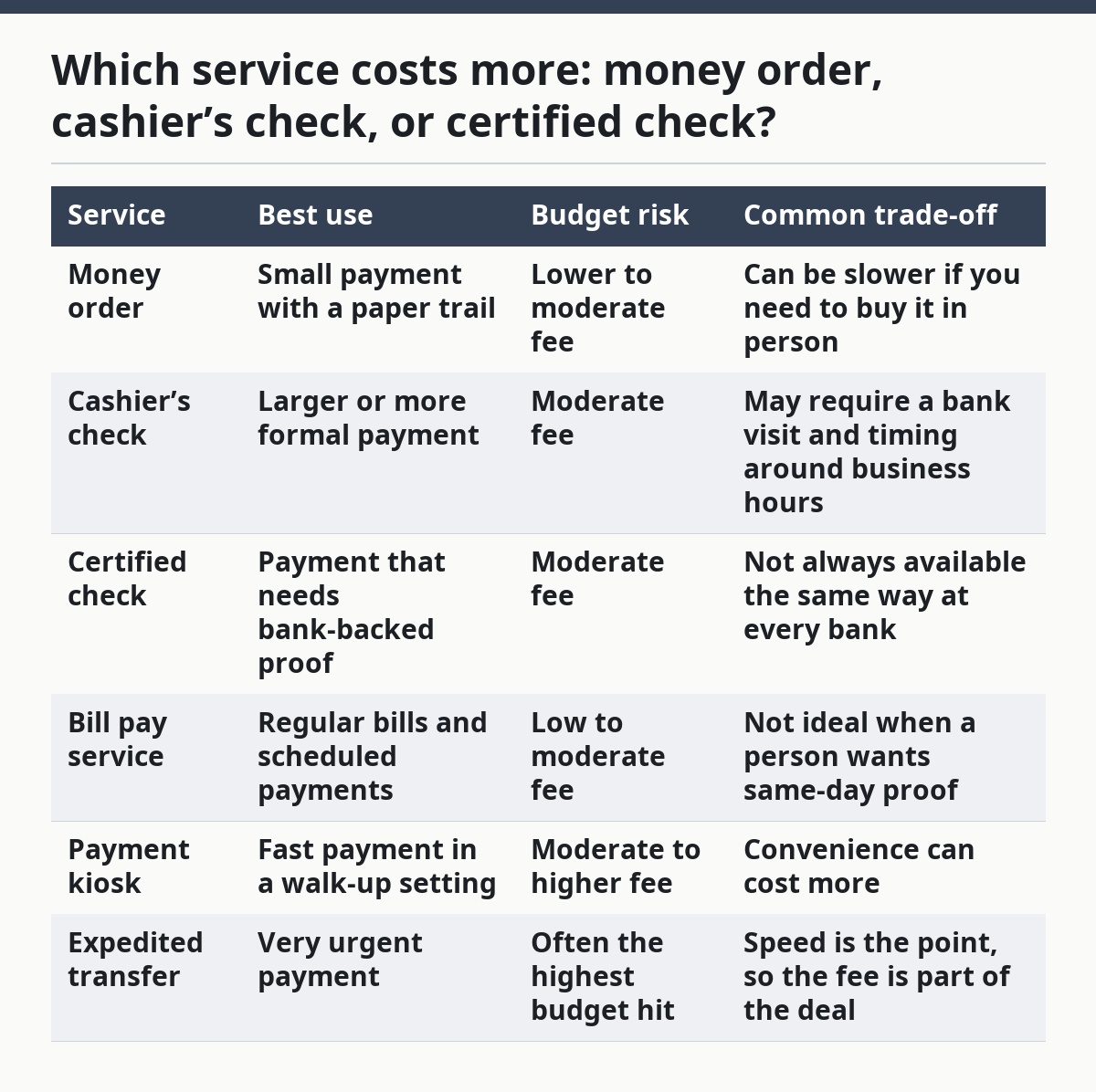
This table is why a one-size budget fails. If you expect to need only a money order and you suddenly need a cashier’s check, the fee can blow up your plan for the week. If your budget has a “paperwork payment” cushion, you can switch tools without pulling from groceries or gas.
A common mistake is picking the payment service by habit. The cheaper choice is not always the right one, but the expensive choice should never be automatic. If the payee accepts a bill pay service and you do not need same-day proof, paying extra for a payment kiosk or expedited transfer may be wasted money.
How do I keep payment service fees from wrecking my month?
You keep payment service fees from wrecking your month by separating them from rent and groceries before the month starts. A fee that shows up after you have already spent the rest of your cash is harder to absorb than one you planned for on day 1.
The cleanest method is to treat payment services like a quarterly bill that happens unpredictably, and CFPB budgeting guidance supports planning for irregular costs instead of waiting for them to appear. Set a small monthly reserve, then let it roll over if you do not use it. That way, a month with no payment services helps pay for the next month that has 2.
Use a simple rule for faster choices. If the payment must clear today or must be accepted in a specific paper form, allow room for a money order, cashier’s check, certified check, payment kiosk, or expedited transfer fee. If the payment can wait, use the lower-cost method and keep the reserve intact.
The biggest budget leak is using cash advances to cover the fee. A cash advance fee can turn a small payment service into a much larger debt problem, and that is a bad trade when the original payment was already planned. If you have to choose, choose the method that avoids borrowing first.
Another mistake is forgetting the hidden timing cost. A bill pay service may be cheap, but if it takes longer than your deadline allows, you may end up paying extra anyway for an urgent backup. That is why the budget should cover both the fee and the backup plan. For help comparing timing and fees, check bill pay versus money order.
When should I pick a money order instead of a check?
You should pick a money order instead of a personal check when the payee wants a more controlled paper payment or when you do not want your own checking account details on the form. Money orders are often used for housing, school, and paperwork situations where the person wants a simpler, separate payment trail.
A money order is also useful when you do not want the risk of a bounced personal check. For a single parent, that matters because a return fee can hurt twice: once from the failed payment and once from the fee itself. A money order avoids that specific risk, though it still costs money up front.
The trade-off is convenience. A money order usually means 1 more stop and 1 more fee, so it is not the best choice for every bill. If a bill pay service is accepted and timing is not tight, that may be cheaper and easier.
Budget for money orders as an occasional but real expense. If you need them only a few times a year, keep a small reserve instead of building the fee into every month. If you use them often, move the amount into a regular category so the cost does not surprise you. USPS money order information is useful here, and CFPB materials on payment methods can help you compare options before you buy.
What should I do when I need to pay fast?
You should compare speed against fee before you choose an expedited transfer or a payment kiosk. Fast service is useful when a deadline is fixed, but speed is exactly what can make the cost jump.
Start with the cheapest method that still meets the deadline. If a bill pay service can finish in time, it usually belongs first in the list. If not, move up to a payment kiosk or expedited transfer only when the timing truly matters.
This is where a backup fund helps the most. Without one, a rush payment can force you into a cash advance, and cash advance fees can make a one-time deadline expensive for the rest of the month. With a reserve, you can pay for speed without borrowing against next week.
The honest limit here is simple: this plan is not for a budget that has no room at all. If every dollar is already spoken for, even a small payment service fee can cause stress. In that case, the right move is to budget for the fee first, then choose the service.
How do I make this work with irregular paychecks?
You make this work with irregular paychecks by building the fee fund from your highest-pay weeks, not by trying to split it evenly every month. A single parent with uneven income needs a payment-services envelope that grows when cash is available and protects the rest of the budget when it is not.
Use this rule: fund the category after essentials, but before discretionary spending. That means rent, food, transport, and child-related basics come first, then the payment-services line, then extras. If your pay fluctuates, the category may be small in 1 month and larger in the next.
A simple tracking habit helps. Write down each money order fee, cashier’s check fee, certified check fee, bill pay service charge, payment kiosk fee, and expedited transfer cost as soon as it happens. After 2 or 3 months, you will see which services are common and which ones are rare enough to keep in reserve only.
This approach is not for someone who wants the cheapest answer every time without thinking about timing. A rushed payment service can cost less in stress but more in fees, and a delayed payment can cost less in fees but more in trouble. The budget has to match the deadline, not just the price tag. For a full overview, see single-parent money management.
What payment service fees should I expect?
You should expect to pay a fee any time the service gives you speed, formality, or proof on demand. Money orders, cashier’s checks, certified checks, bill pay service charges, payment kiosk fees, and expedited transfer costs can all show up as separate line items.
The safest budget is one that assumes at least 1 fee will pop up during a busy month. If you do not use it, the money stays in the reserve. If you do use it, you already planned for the hit.
How much should I budget for cashier’s checks?
You should budget enough to cover the check itself plus a little extra for the trip or timing around it. A cashier’s check is not just a paper form; it is a service with a fee and often a bank-specific process.
If you use cashier’s checks only for rare paperwork, keep them in your emergency payment category instead of your monthly bills. If you use them more often, put them in a standing line so the fee does not drain the rest of the budget.
When do people need a money order instead of a check?
People need a money order instead of a check when the payee wants a more controlled paper payment or when a personal check is not a good fit. It is common in situations where the recipient wants less risk and a cleaner paper trail.
A money order costs money, but it can be worth the fee if it prevents a returned payment. That is why the budget should include both the fee and the reason you might need it.
Sources
- USPS Postal Money Orders: https://www.usps.com/shop/money-orders.htm
- Consumer Financial Protection Bureau, checks and payment methods: https://www.consumerfinance.gov/ask-cfpb/category-checks-money-orders-and-other-payment-methods/
- FDIC Money Smart: https://www.fdic.gov/moneysmart
Drafted with AI; not yet reviewed by a person.