Last updated: November 20, 2026
Quick Answer: budget at least for four setup items—installation, activation, equipment, and a possible deposit—before the first month starts. For a single parent, the biggest surprise is usually not the plan price; it is the installation fee, activation fee, modem or router rental, and any deposit that lands all at once. This guide to How to Budget for Home Internet Installation and Equipment Fees as a Single Parent focuses on the first bill, not just the monthly plan.
Key takeaways
- Start with the charges that hit before the first month of service is even useful.
- Ask the provider to list every setup fee in writing so you can compare offers side by side.
- Buying a modem can cost more at the start, but rental fees can keep adding up each month.
- A move to a new address can trigger new installation work, even if the internet service itself stays the same.
- Use a small buffer for deposits and cable extras so the setup does not drain the grocery budget.
What should I budget for first?
You should budget first for the installation fee, activation fee, equipment costs, and any deposit. Those four items are the core startup charges for home internet setup, and they can appear before you have a working connection at home.
Therefore, treat setup as a separate bill from the monthly plan unless a provider gives you a clear written total; the FCC’s consumer broadband guides are a good place to check fee terms before you agree to an offer. If you only save for the first month of service, you can still get caught short by the modem, router, or a required deposit. That matters more for a single parent because the setup money often has to come from the same account that pays rent, food, and school costs.
Use a separate savings line for each charge:
- Installation fee — the labor or visit charge for getting service connected.
- Activation fee — the charge for turning the account on.
- Equipment fee — the cost to rent or buy a modem and router.
- Deposit — money the provider may hold before service starts.
A useful budget move is to label the money by category before you order service. That way, if the provider waives one fee, you can keep the extra money instead of spending it elsewhere.
Specifically, the FCC consumer broadband guides can help you compare fee terms and equipment options before you agree to an offer. The labels may look different by provider, but the same cost buckets usually show up.
How do I figure out the startup cost?
You figure out the startup cost by listing every fee the internet service provider names, then deciding which ones are one-time and which ones repeat. That gives you the real first-day cost instead of a guess.
Use this order when you build the number:
- Read the offer sheet and circle the installation fee, activation fee, deposit, and equipment charges.
- Identify the modem and router charges separately, because one provider may rent both while another includes one device.
- Mark the hardware standard if it is listed, such as DOCSIS 3.1 for cable service or Wi‑Fi 6 / 802.11ax for a newer router, since that tells you what you are paying for.
- Add any extra visit charge if the provider needs a technician at the home.
- Save a small cushion for taxes, cables, or replacement parts that may not be obvious on the first quote.
This matters because a cheap plan can still have a heavy startup cost. A provider that advertises a low monthly rate may shift part of the burden into equipment rental or a higher deposit. A different provider may look more expensive on paper but have lower setup charges.
The better comparison is not simply “which plan is cheapest?” It is “which plan leaves the most cash in my account after the first week?” For a single parent, that is often the number that decides whether internet gets installed now or gets delayed.
What fees show up on a new internet account?
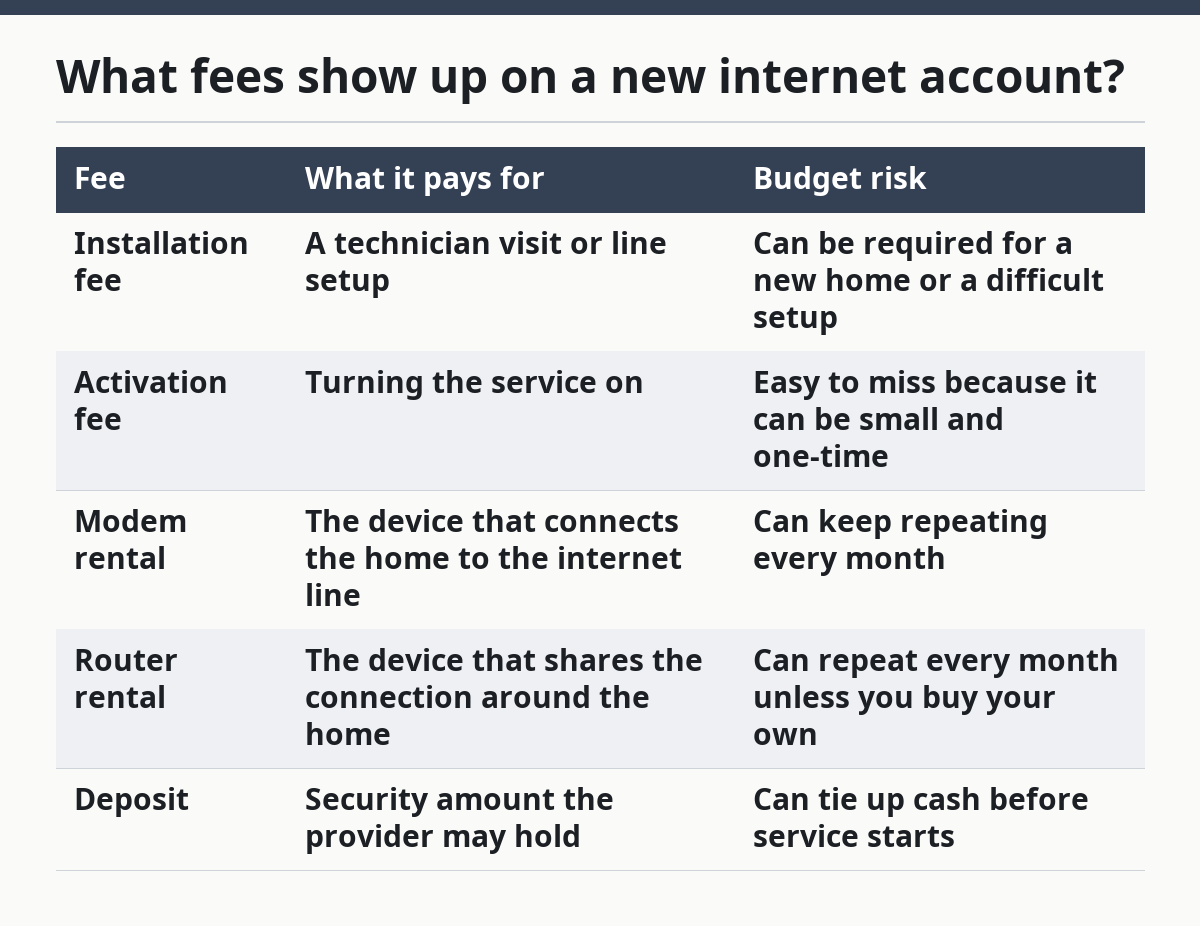
A new internet account can include installation, activation, modem rental, router rental, and a deposit. Some providers combine a few of these into one line, but the charges still count separately in your budget.
Here is how the common fees usually work:
| Fee | What it pays for | Budget risk |
|---|---|---|
| Installation fee | A technician visit or line setup | Can be required for a new home or a difficult setup |
| Activation fee | Turning the service on | Easy to miss because it can be small and one-time |
| Modem rental | The device that connects the home to the internet line | Can keep repeating every month |
| Router rental | The device that shares the connection around the home | Can repeat every month unless you buy your own |
| Deposit | Security amount the provider may hold | Can tie up cash before service starts |
Some homes need only basic activation, while others need more work. If the building has older wiring, a locked entry, or no active line at the new address, the setup can become more expensive and take longer. That is why the same provider can quote very different startup costs for two addresses on the same street.
For budgeting, think in two layers: the fee you must pay today and the fee that follows you each month. The first layer affects whether you can get connected right away. The second layer affects whether the connection stays affordable after the first bill arrives.
Is it cheaper to rent or buy a modem?
Buying a modem is often cheaper over time, but renting is easier on the first bill. That trade-off matters if you need the connection working now and cannot absorb a larger upfront payment.
A rented modem is simple: the provider supplies the hardware and you pay for it as part of the bill. That lowers the amount due on day one, which can help if cash is tight. The downside is that the charge repeats, and the modem is not yours.
Buying a modem usually costs more at the start, but it can reduce the monthly bill later. That makes more sense if you expect to keep the same provider for a while and want to avoid repeated rental charges. It also gives you more control if you later change internet service providers, since you may already own compatible hardware.
The same choice applies to the router. A modem connects the home to the service line, while the router spreads the signal around the home. Some providers bundle both functions into one device, while others split them into two rentals or two purchases.
A practical rule is this: if the startup budget is tight, rent first and switch later if the numbers still work. If the startup budget can handle the hardware purchase, buying can be the cleaner long-term choice. The wrong move is buying gear that does not match the provider’s service type, such as picking a modem that does not fit the plan’s network standard.
How do I budget for a move to a new address?
You should budget for a move as a new setup unless the provider confirms that your equipment and service can move without a fresh installation fee. A new address often changes the cost, even when the same company handles the account.
Moving can trigger three separate expenses. First, the provider may need to transfer the account. Second, the new home may need a technician visit. Third, you may need different equipment if the old modem or router is not compatible with the new service type.
Once you know the move may require new work, build a “keep service” line and a “restart service” line. The first covers the hope that the move is simple. The second covers the reality that the new address may need a new activation, new deposit, or new hardware. That second line keeps the move from wrecking the month’s cash flow.
This is especially important if the move happens during a school month or in the middle of a work schedule. If the provider offers a self-install option, compare it with the cost of a technician visit, but only if your home already has the right wiring and service access.
How do I keep setup costs from breaking the month?
You keep setup costs from breaking the month by setting a cap before you order service and refusing to add extras that are not necessary on day one. That cap should cover the likely setup bill plus a little room for a deposit or equipment fee.
A strong approach is to build the setup fund in three parts. First, save for the highest likely installation charge. Second, set aside enough for modem and router rental or purchase. Third, hold a small buffer for the deposit, because deposits can change based on account history or the provider’s rules.
The biggest mistake is to focus only on the advertised plan price. That can make the service look affordable and the first bill look shocking. A second mistake is paying for higher-end equipment than the home needs right away. A Wi‑Fi 6 router may be useful in some homes, but it is not the first dollar to spend if you still need money for installation and the initial bill.
If money is very tight, choose the setup that gets the home online with the fewest moving parts. A plain modem, a basic router, and a standard installation are usually easier to budget for than premium hardware plus a technician visit. That is the trade-off: fewer features now, less strain on the first bill.
A fuller guide to the rest of the tech budget sits in the main hub for Single-Parent Technology and Digital Service Costs.
What does a bad setup bill look like?
A bad setup bill is one that hides charges, mixes one-time fees with recurring rentals, or makes the first payment much larger than you expected. If the quote is hard to read, the budget risk is already high.
Watch for these warning signs:
- The provider will not separate the installation fee from the activation fee.
- The modem and router are listed only as one lump charge.
- A deposit appears late in the order, after you already entered payment details.
- The provider says self-install is possible but still adds a technician fee.
- The equipment listed does not match the home’s service type, such as a cable setup that calls for DOCSIS 3.1 but offers different hardware.
A bad bill usually means one of two things: the setup was not explained clearly, or the provider is adding charges that the household does not need. Either way, the fix is the same. Stop and ask for the full first-bill total before you agree.
If you cannot get a clear total, treat that as a budget problem and ask a trusted financial counselor, local consumer office, or FCC broadband help resource for guidance before you sign. A clean quote should tell you what is one-time, what repeats, and what can be avoided by using your own modem or router.
FAQ
How much should I set aside for internet installation?
You should set aside enough to cover the installation fee, activation fee, equipment charges, and a possible deposit. The exact total depends on the provider, the home, and whether a technician has to visit. If you are budgeting tightly, keep a small buffer so the first bill does not force you to pull from groceries or transit money.
Is it cheaper to rent or buy a modem?
Buying is often cheaper over time, while renting is easier at the start. Renting lowers the upfront hit, but the charge can keep repeating. Buying costs more now, yet it can reduce the monthly bill later if the modem is compatible with the service and you stay with the same provider.
What fees show up on a new internet account?
A new account can include installation fees, activation fees, modem rental, router rental, and a deposit. Some providers combine charges, so the bill may not spell them out clearly. That is why it helps to ask for the first-month total before you sign up, especially if you are also covering a move.
Drafted with AI; not yet reviewed by a person.