Last updated: November 20, 2026
Privacy means controlling who can see, use, and keep your personal data. Quick Answer: use 2 tests for privacy questions—what data is being collected, and what happens if you say no. If those answers are unclear, treat the privacy setup as too risky until you get them, and consider asking a privacy professional or lawyer if the data is sensitive. The topic here is Privacy: related questions, and it is easier to judge when the answers are concrete. See the FTC’s privacy guidance here: https://www.ftc.gov/business-guidance/privacy-security
Key takeaways
- Privacy is not only about hiding data; it is about limiting collection, sharing, and retention.
- A good privacy answer names the data, the purpose, the retention period, and the sharing rule.
- The biggest red flags are vague notices, forced consent, and settings that are hard to change.
- If a service needs your data for a legal or basic function, that is different from data used for ads or profiling.
- Stronger privacy usually means more friction, fewer personalized features, or extra steps like 2-factor authentication.
What does privacy actually mean?
Privacy means a person has some control over personal information, not that the information never gets collected. In practical terms, that includes name, email, phone number, location, device IDs, payment details, and browsing history.
A privacy notice should answer 4 plain questions: what data is collected, why it is collected, who gets it, and how long it is kept. If those 4 points are missing, the notice is too thin for a real decision. The General Data Protection Regulation (GDPR) and the California Privacy Rights Act (CPRA) both push companies to explain these basics more clearly. For related privacy questions, those laws are a good baseline, not a substitute for reading the notice itself.
Privacy is not the same as secrecy. A bank, school, or employer may need some data to do its job, but that does not give it a blank check to collect extra details or keep them forever. The useful rule is simple: the more sensitive the data, the stronger the reason should be. For background on privacy controls, NIST’s privacy framework is a useful standard-setting source: https://www.nist.gov/privacy-framework
Which privacy questions matter first?
The first privacy questions are the ones that change whether a person should share data at all. These are not abstract legal questions; they are decision questions.
Therefore, ask these 5 in order:
- Is the data required or optional?
- What is the stated purpose?
- Is the data shared with third parties?
- Can the choice be changed later?
- How long is the data stored?
A privacy notice that answers all 5 is much easier to trust than one that hides the real terms in a 40-page policy. A short statement can still be honest if it is clear. A long statement can still be misleading if it buries the key point on page 12.
The main trap is assuming “privacy policy” means “safe.” It does not. It only means the organization has written down its rules, and those rules can still favor broad collection unless the user checks the details.
What should a privacy policy tell you?
A useful privacy policy tells you the data type, the use case, the sharing rule, and the retention period. If it does not say those things plainly, the policy is hard to rely on.
| Criteria | Clear privacy policy | Weak privacy policy | Winner for this condition |
|---|---|---|---|
| Data collected | Names the exact categories | Uses broad words like “information” | Clear privacy policy |
| Purpose | Ties data to a specific use | Says “to improve services” only | Clear privacy policy |
| Sharing | Lists third parties or groups | Says data may be shared “as needed” | Clear privacy policy |
| Retention | Gives a time frame or rule | Does not say how long data is kept | Clear privacy policy |
| User control | Explains delete, opt-out, or access steps | Hides controls behind extra pages | Clear privacy policy |
| Consent | Says what is optional and what is required | Bundles everything into one yes/no choice | Clear privacy policy |
| Children’s data | Names age rules and protections | Skips child-specific handling | Clear privacy policy |
| Security | Mentions basic safeguards | Says only “we take security seriously” | Clear privacy policy |
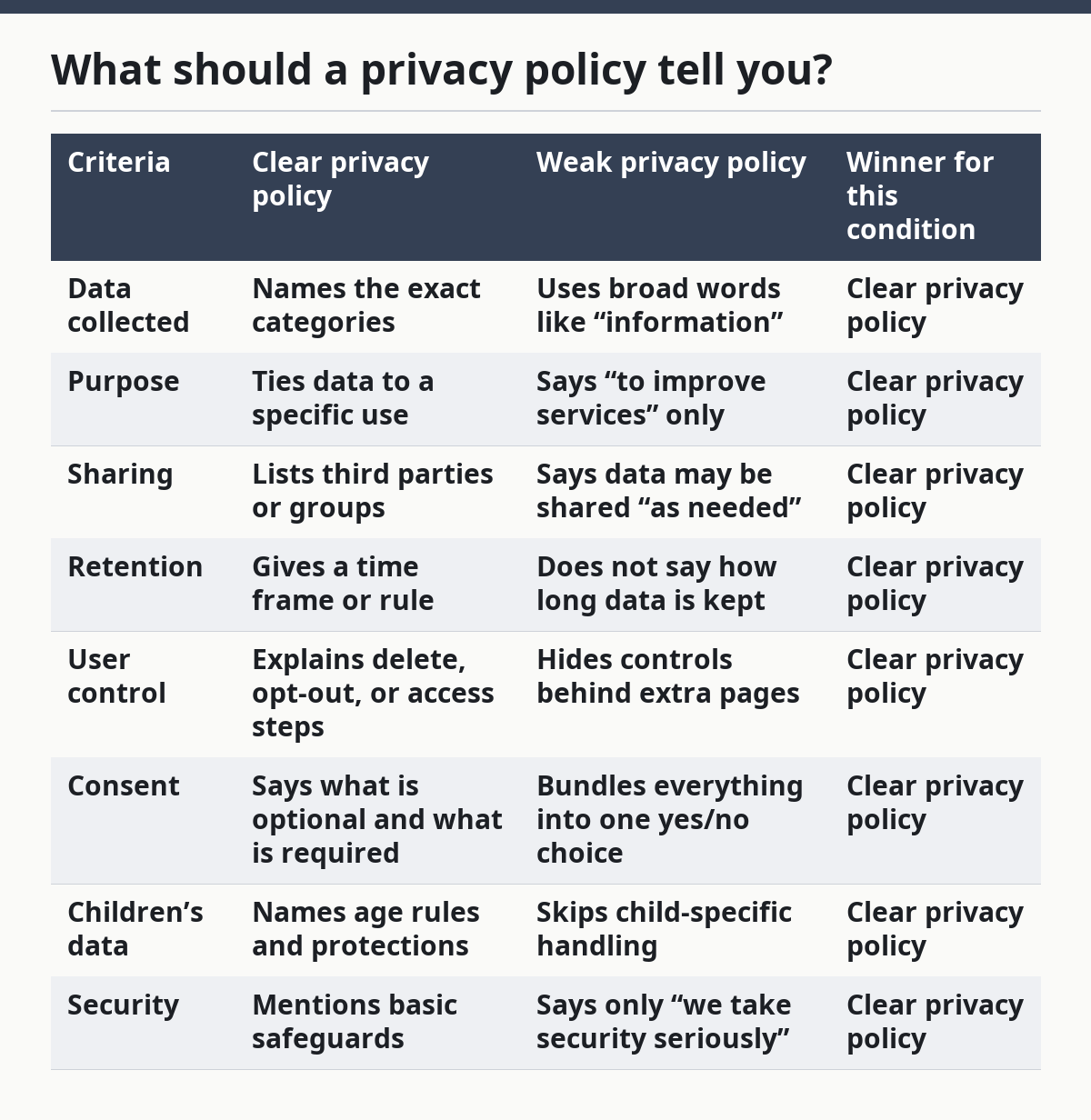
So a clear policy wins for anyone deciding whether to sign up, download, or hand over an email address. A weak policy may not violate the law in every case, but it shifts more risk to the user. That matters most when the data is sensitive, like precise location or payment details.
One good external reference point is the U.S. Federal Trade Commission’s privacy and security guidance, which explains how consumer data should be handled in plain terms: https://www.ftc.gov/business-guidance/privacy-security
Why do privacy settings still feel confusing?
Privacy settings feel confusing because many services default to more sharing than most people expect. The burden often falls on the user to find a 6-step settings path or to decline choices one by one.
That is a real problem because consent loses meaning when the choice is buried. If the “no” option is hard to find, or if the service keeps asking again, the user is not making a clean decision. A person should look for 2 things: whether the setting affects core service use, and whether the setting stays put after it is changed.
This is where “privacy by default” matters. Good design starts with the least invasive setting and asks for extra permission only when needed. If a service starts with broad sharing and makes the user undo it, the setup is working against the user’s interest.
Is privacy the same as security?
No, privacy and security are related but not the same. Security keeps data from being stolen or exposed; privacy limits how much data is collected and who may use it in the first place.
However, a service can be secure and still raise a privacy issue. For example, a platform may protect stored data well while still collecting too much of it for ads, profiling, or partner sharing. That is why a user should not stop at “Is it encrypted?” The better question is, “Does it need this data at all?” If the answer is unclear, a privacy professional can help interpret the risk.
Security basics still matter. Two-factor authentication, strong passwords, and account alerts reduce the chance that someone else gets into an account. But those steps do not fix overcollection, and they do not erase a policy that keeps data longer than needed.
For a second authoritative reference, NIST’s privacy framework is a useful standard-setting source: https://www.nist.gov/privacy-framework
When should you say no?
You should say no when the data is optional, the purpose is vague, or the sharing terms are broader than the benefit. That is the cleanest rule.
Saying no is especially wise if the service asks for sensitive details before giving a clear reason. Location data, contact lists, government IDs, and payment data deserve extra caution. If the service cannot explain why it needs those details in one or two plain sentences, the request is weak.
There are trade-offs. Saying no can reduce personalization, block some features, or require extra manual steps. That is the price of privacy in many systems. But giving up data without a clear reason can create a longer problem than a little inconvenience now.
When is sharing data reasonable?
Sharing data is reasonable when the data is required for the service to work and the use is narrow. A package delivery app needs an address. A payroll system needs tax and bank information. A school portal needs student and parent contact details.
The line is whether the service asks for more than it truly needs. If a basic service asks for contacts, precise location, or permission to track behavior across other sites, the request is no longer minimal. A cautious approach is to share only the 1 or 2 details the service actually requires and to decline the rest.
A good privacy choice often looks boring. It means fewer checkboxes ticked, fewer cross-app permissions, and fewer marketing opt-ins. That is not a failure. It is usually the sign that the user kept control.
What are the biggest red flags?
The biggest red flags are vague wording, forced consent, and hidden sharing. Those 3 problems usually show up before a user has a serious issue.
Watch for these warning signs:
- The policy says “may” or “can” without limits.
- The opt-out path is buried behind several menus.
- The service links privacy choices to unrelated features.
- The notice never says how long data is stored.
- The company avoids naming third parties.
A single red flag may not always be enough to walk away, but 2 or 3 together are a strong signal to stop. The same is true when a company keeps changing its privacy terms without making the change easy to see. A trustworthy setup should not require detective work.
Privacy questions people ask most
What is the simplest definition of privacy?
Privacy is control over personal information. It means knowing what data is collected, why it is collected, and who can see it.
Is “private” the same as “anonymous”?
No, private and anonymous are different. Private data is limited or protected, while anonymous data should not directly identify a person, though it can still sometimes be linked back through patterns or extra data.
Does turning off tracking fix privacy?
It helps, but not completely. Turning off tracking can reduce profiling, yet the service may still collect data for account use, fraud prevention, or legal reasons.
What is the most important privacy habit?
Reading the first screen of a privacy notice and checking the opt-out path is a useful habit, but it is not the only check. If the key facts are missing there, the rest of the policy usually will not save it.
Should every app get full permission?
No. Full permission is too broad for most services. A safer choice is to give only the access that the app needs for its main job and nothing extra.
The bottom line
Privacy questions are really decision questions: what is collected, why it is collected, and what happens if the answer is no. If those answers are clear, the choice is easier. If they are vague, the safest move is to pause, ask for a clearer explanation, or choose a less invasive option.
Drafted with AI; not yet reviewed by a person.