
Last updated: November 20, 2026
Quick answer: for irregular pay, 1 spreadsheet is usually the best starting point because it keeps the next rent payment, grocery run, and bill due date visible in one place. In Spreadsheets and Budget Tools — The Complete Guide: related questions, that usually means choosing the tool that helps with cash flow first, then convenience second.
Key takeaways
- A spreadsheet gives you the clearest picture when pay dates change from week to week.
- A budget tool saves time when you want bank transactions pulled in automatically.
- The main risk with spreadsheets is drift: if you stop updating them for 2 weeks, the plan can fall behind reality.
- The main risk with budget tools is trust: bank sync can miss or mislabel transactions, so you still need to check the numbers.
- If money stress is already turning into missed rent or overdrafts, a simple 30-day cash flow plan matters more than a fancy app.
What problem are these tools solving?

These tools solve the same problem: they show where money is going before it disappears. For irregular income, that matters more than a perfect monthly budget, because a normal 30-day plan can break when a shift is cut or a payment arrives late.
A spreadsheet works as a custom map. It lets you build around your own pay cycle, use your own category names, and show bills by due date instead of by calendar month. That flexibility is the big reason people with variable income keep coming back to Excel or Google Sheets in Spreadsheets and Budget Tools — The Complete Guide: related questions.
A budget tool works as a system with guardrails. It can pull in transactions, sort spending into categories, and send alerts when a bill is due or a category is close to empty. For many busy parents, that cuts the time cost, which is often the real barrier.
Because the CFPB budgeting pages and the IRS Tax Withholding Estimator both point to the same idea, good money decisions depend on current numbers, not vague estimates. A tool helps only if it makes those numbers easier to see, not harder. https://www.consumerfinance.gov/consumer-tools/budgeting/ and https://www.irs.gov/individuals/tax-withholding-estimator
Spreadsheet or budget tool: what is the real difference?
The real difference is control versus convenience. A spreadsheet wins on control because every formula, category, and due date can be set exactly how you need it; a budget tool wins on convenience because it does more of the tracking for you.
Here is the plain comparison.
| Criteria | Spreadsheet | Budget tool | Winner for condition |
|---|---|---|---|
| Setup style | Manual layout, custom formulas, any format | Guided setup, usually fixed structure | Spreadsheet for custom income patterns |
| Paycheck timing | Easy to model uneven pay dates | Often built around monthly flow | Spreadsheet for variable pay |
| Bank sync | Usually none unless added through links/imports | Often automatic | Budget tool for low-maintenance tracking |
| Error control | You can inspect every formula | You trust the sync and category rules | Spreadsheet for users who want visibility |
| Speed after setup | Slower if you enter everything by hand | Faster after account linking | Budget tool for busy weeks |
| Flexibility | High, including week-by-week planning | Moderate, depends on app design | Spreadsheet for special cases |
| Alerts | Must be built or tracked manually | Common feature | Budget tool for bill reminders |
| Backup and export | Easy to save as XLSX or CSV | Depends on app and export rules | Spreadsheet for portability |
| Learning curve | Steeper at first | Usually gentler | Budget tool for beginners |
| Privacy feel | More private if kept local | More sharing with financial data | Spreadsheet for privacy-minded users |
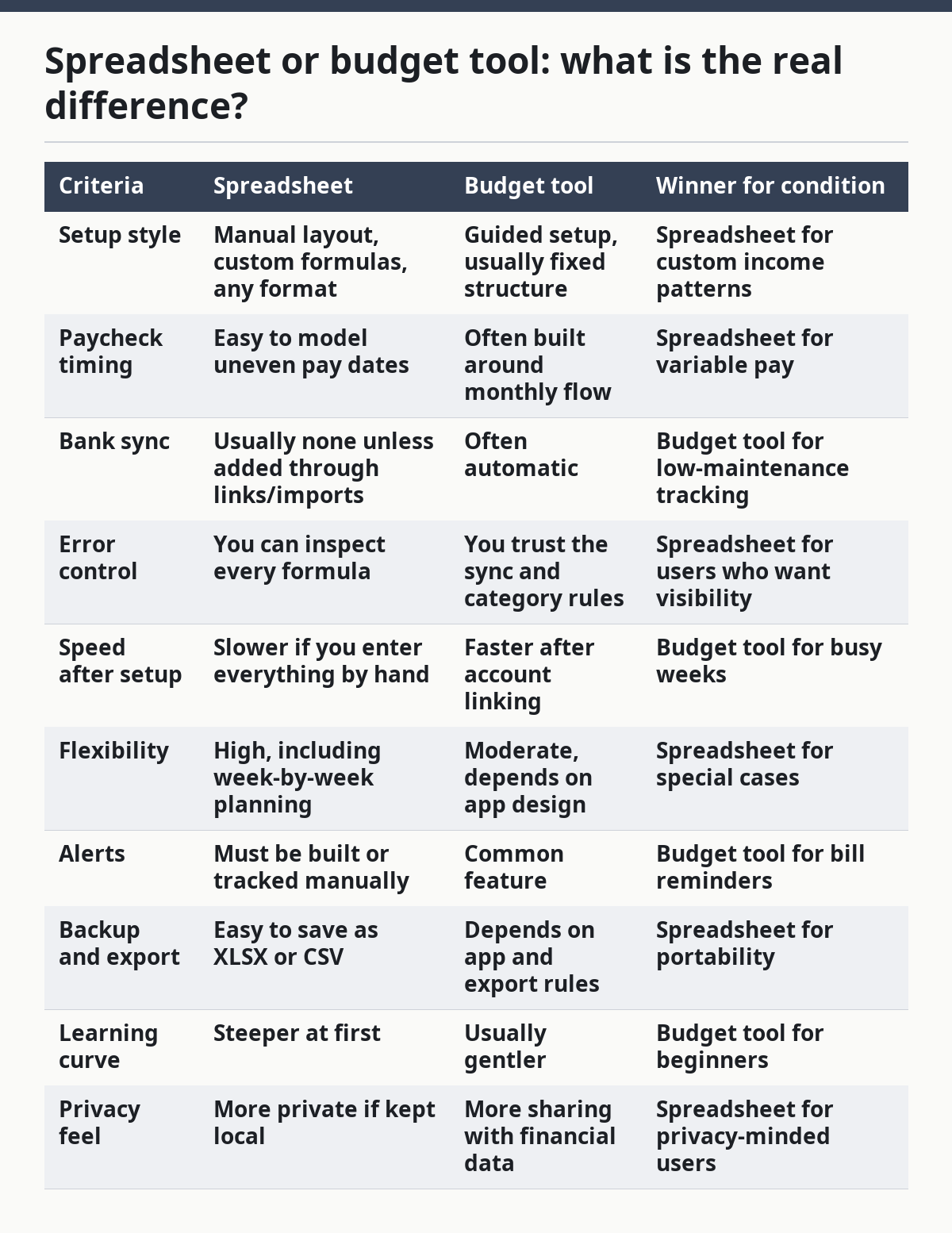
The cleanest rule is this: if you want to think in cash flow and due dates, use a spreadsheet. If you want the software to do the watching, use a budget tool.
When does a spreadsheet win?

A spreadsheet wins when your income is irregular enough that a monthly app view hides the real problem. That is common when paychecks change from 2 weeks to 3 weeks, overtime comes and goes, or child-related expenses cluster in one part of the month.
The strength of a spreadsheet is that it can show a 30-day or 45-day cash flow window instead of a neat but misleading monthly total. It can also separate “money already spoken for” from “money still free,” which matters when the next paycheck is smaller than the last one. A simple sheet can track rent, utilities, groceries, gas, school costs, and a small buffer in one row or one tab.
The weak spot is maintenance. If the sheet is not updated after each paycheck or bill, the numbers drift. For a parent juggling school pickup, work changes, and household tasks, that is a real drawback because a stale spreadsheet can create false confidence.
A spreadsheet is best for someone who can spare 10 to 15 minutes at a time and wants a budget that matches real life instead of app defaults. It is not the strongest choice for someone who wants automatic transaction tracking or feels overwhelmed by formulas. A plain Google Sheet or Excel file is enough; a complicated workbook usually makes the job worse.
When does a budget tool win?
A budget tool wins when time matters more than customization. If the main problem is that bills, receipts, and card charges pile up faster than they can be sorted, a tool that imports transactions can save a lot of manual work.
The strength of a budget tool is speed after setup. Once accounts are linked, the tool can assign categories, flag unusual spending, and show whether a grocery budget or gas budget is running low. That helps when the budget needs daily attention but the schedule leaves little room for manual entry.
The trade-off is less control. A budget tool may group transactions in a way that does not fit a single parent’s real priorities, especially if child costs, school costs, or shared household costs need their own labels. Sync can also miss a transaction, delay an update, or categorize a charge in a way that needs correction.
A budget tool is best for someone who wants fewer spreadsheets, fewer hand entries, and more reminders. It is not the strongest choice if privacy is a top concern, if bank linking feels risky, or if income changes are so irregular that the app’s monthly view keeps hiding the next bill gap.
What should an irregular-income parent use first?
A spreadsheet should be the first choice for most single parents with irregular paychecks, because it handles uneven cash flow better. The reason is simple: when income does not arrive on a fixed schedule, the budget needs to answer “what can I cover before the next paycheck?” more than “what did I spend this month?”
So start with four lines: income, fixed bills, variable essentials, and a small buffer. Then add bill due dates, not just bill names. That turns the sheet into a real payment calendar, which is more useful than a neat summary table that looks good but does not prevent a late fee.
A budget tool becomes the better first choice if the sheet is already going stale. If the issue is not design but follow-through, a tool with automatic imports and reminders may be more realistic. It can also help if the household uses several accounts and the goal is to spot spending fast rather than build a custom system.
The most useful rule is not “which is smarter” but “which gets updated.” A plain, updated spreadsheet beats a fancy tool that is ignored. A budget tool beats a perfect spreadsheet that nobody opens after Tuesday.
What should you avoid in either one?
Avoid any system that treats irregular income like a neat salary. If the picture is getting messy, consult a nonprofit credit counselor or housing counselor, and use a basic cash flow plan that fits the real pay schedule. The CFPB and National Foundation for Credit Counseling both point people toward current numbers and help when bills are already hard to manage: https://www.consumerfinance.gov/consumer-tools/budgeting/ and https://www.nfcc.org/
In a spreadsheet, avoid too many categories. A long list can make the sheet feel precise while making it harder to use. If the budget takes more than a few minutes to update, it will start losing attention.
In a budget tool, avoid trusting the categories without checking them. Auto-labeling is useful, but it is not a substitute for knowing whether a charge belongs to groceries, school supplies, or a one-time repair. The tool can also tempt users to look at spending totals while ignoring due dates, which is exactly the wrong trade for irregular pay.
If money problems are already turning into collections, repeated overdrafts, or missed rent, this is not just a tool question. A nonprofit credit counselor or housing counselor may be the better next step, because the budget alone cannot fix a cash flow crisis.
Which one should you choose?
Choose a spreadsheet if your income changes from paycheck to paycheck and you need a 30-day view of cash flow, bills, and due dates. Choose a budget tool if you want automatic imports, bill reminders, and less manual work. Neither if you are already behind on essentials and need outside help with debt, rent, or bill triage first.
That is the cleanest answer for this topic. For a single parent with irregular pay, the strongest choice is the one that shows the next two weeks clearly and gets used on a tired day, not just on a good one.
What if the usual choice is wrong?
The usual choice flips in three cases. First, a spreadsheet stops being the better option if the numbers are never updated; at that point, automation matters more than flexibility. Second, a budget tool stops being the better option if bank sync is unreliable for your accounts or if privacy concerns keep you from linking them.
Third, neither option is enough if income swings are extreme and bills are already unstable. In that case, a bare-bones bill list, a call to creditors, or help from a nonprofit counselor may do more than any app. The tool can support the plan, but it cannot replace a plan that matches the actual cash on hand.
Is a spreadsheet better for irregular pay?
Yes, a spreadsheet is usually better for irregular pay because it can be built around due dates and cash flow instead of a fixed month. That matters when one paycheck has to cover more than one bill cycle.
A budget tool can still work, but it often needs more manual checking to make sure the timing matches reality. For irregular pay, timing is the whole game.
Do budget tools work without bank syncing?
Yes, many budget tools still work without bank syncing, but they lose one of their biggest advantages. Without imports, the tool becomes closer to a manual tracker, so the time savings shrink.
If the point is to reduce work, bank sync is the feature that usually justifies the switch. If that feature is off the table, a spreadsheet may be the simpler choice.
Can I use both together?
Yes, and that can be a smart setup for some households. A spreadsheet can hold the master cash-flow plan, while a budget tool can handle reminders and transaction tracking.
The downside is extra maintenance. If both systems are not updated, they can disagree, and that creates confusion fast. Use both only if each one has a clear job.
What is the simplest place to start?
The simplest place to start is a one-page spreadsheet with income dates, bill due dates, and a 30-day cash view. That gives the clearest picture with the least moving parts.
If the sheet starts to fail because it is not being used, move to a budget tool with reminders and imports. The right system is the one that stays honest when life gets busy.
Drafted with AI; not yet reviewed by a person.