Last updated: November 20, 2026
The cheapest workable setup is not the one with the fewest devices; it is the one that covers school, work, and emergencies with the fewest paid services. For most single parents, that means one reliable phone, one computer or tablet, a stable internet plan, and a hard cap on subscriptions that renew every month. The wrong move is paying for convenience you only use once a week.
A useful budget starts with fixed needs, not with brand names. If you are trying to keep tech and digital service costs under control on one income, the answer is usually to trim recurring charges before you cut the tool that keeps work, school, and child care running.
Key takeaways
- Put the money into the tools that affect school, work, and contact with caregivers first.
- Treat monthly subscriptions as a bill, not a treat, because they add up fast.
- A cheaper device can cost more if it fails and forces a rushed replacement.
- Free or low-cost services matter most when they replace a paid tool you barely use.
- The best setup changes if your job depends on speed, storage, or constant video calls.
What costs matter first?

The first costs to sort are internet, a phone, and one shared screen for school or work. Those three items do more for a single parent than a pile of niche apps, extra streaming services, or premium cloud storage plans.
A plain budget works better than a guess. Start with the bills that repeat every month, then add the ones that come once or twice a year, such as a device replacement fund. The Consumer Financial Protection Bureau has a practical budgeting tool at its budgeting page that fits irregular income because it forces you to name every fixed bill before the rest of the money gets spoken for.
The first trap is undercounting digital spending because each charge looks small. A phone plan, a home internet bill, a school app, a password manager, two streaming services, and extra cloud storage can feel harmless in isolation. Together they can act like a second utility bill.
The second trap is buying for a worst-case day and paying for it every month. A family that only needs video calls for homework help does not need the same plan as a home office that runs uploads all day. A parent who mainly texts, checks school portals, and uses maps can often do fine with a simpler setup.
One good rule is to separate “must work today” from “nice to have later.” Must-work items include the device you use to sign forms, contact school staff, apply for jobs, and handle health portals. Nice-to-have items include premium photo backups, ad-free entertainment, and paid upgrades that do not change daily life.
How do I budget when my paychecks are irregular?
The safest way to budget irregular income is to fund the same 3 buckets in the same order every time money comes in. The buckets are essentials, sinking costs, and extras.
Essentials are the bills that keep life moving this week. In this topic, that usually means phone service, internet, and the device payment or replacement fund if you have one. Sinking costs are expenses that do not hit every month but still arrive, such as a new charger, a school laptop repair, or a battery replacement after 18 to 24 months of heavy use.
Extras are the first place to cut. That includes add-on subscriptions, app upgrades, game passes, and duplicate services. If money comes in unevenly, the trick is to split each deposit on day 1, not on day 28 when the account is already under pressure.
A 30-day review cycle helps more than an annual one. Once a month, look at every digital charge and ask three questions: did this service save time, did anyone in the household use it, and would the month work without it? If the answer is “no” twice, cancel it.
The U.S. Federal Communications Commission also explains low-income phone support through the Lifeline program. If you live in the U.S. and qualify, that kind of support can change the math on a phone plan, but you still need to check the current rules and eligibility.
The best budget for irregular pay is not the tightest one. It is the one that leaves you room to absorb a bad week without turning off the internet, missing a school message, or carrying a late fee into the next month.
Is it better to buy one good device or use a cheap one and replace it later?

One good device usually wins if the device is needed daily for school, work, or family logistics. A cheap device only wins when the tasks are light and the risk of failure is low.
A laptop or tablet used for forms, homework, email, video calls, and file uploads needs to hold up for years, not weeks. If a bargain device freezes, loses battery fast, or has too little storage, the hidden cost is time. For a single parent, time has real value because every extra restart or failed update can eat into bedtime, pickup time, or a lunch break.
Refurbished gear can make sense when the seller offers a clear return window and the device still supports current software. That is often smarter than buying a shiny low-end model that struggles on day one. A device that still receives updates is more useful than one with a nicer screen and no support path.
The downside of paying more up front is obvious: the bill hurts now. The upside is less visible but more important. A stable device lowers the odds that you will need a panic purchase when a school deadline lands on the same week as rent.
This is where many generic guides get the advice wrong. They talk about “saving money” as if the cheapest sticker price is the whole story. It is not. A device that lasts 3 years and keeps working under load can cost less than a cheaper one that fails in 8 months and forces a replacement.
Who should skip the pricier route? Anyone who uses the device only for occasional browsing, basic messaging, and a single school portal may not need to pay for stronger specs. But once the device becomes the household’s main work and school machine, the weak option turns expensive fast.
Which digital services are worth paying for?
The services worth paying for are the ones that remove real friction every week, not the ones that feel useful once a month. For most single parents, that means a reliable internet plan, one mobile line with enough data for emergencies, and maybe one paid cloud or productivity service if it prevents lost files.
The services that often do not earn their keep are duplicate streaming subscriptions, premium app tiers, multiple note-taking tools, and storage plans that exceed the household’s actual file load. If two services solve the same problem, one of them is probably wasting money.
Paid services can still be smart. A family calendar app that keeps school pickup, doctor visits, and custody changes in one place may be worth a modest fee if it prevents missed events. A cloud backup plan can also be worthwhile when the device carries photos, school documents, and job paperwork that would be painful to lose.
The mistake is paying for “peace of mind” without a real use case. If a service is only there because you might need it someday, it is probably not a priority. That is especially true when the cost repeats every month and the cancellation path is buried behind 4 screens of settings.
A simple test helps here: if the service disappeared tomorrow, would life be harder in a concrete way within 7 days? If not, it belongs in the cut pile.
Lean setup or paid bundle?
A lean setup wins for most single parents because it keeps the monthly bill smaller and easier to control. A paid bundle only wins when it clearly reduces separate charges, saves time every week, or includes a feature that prevents a bigger cost later.
The decision is not about being frugal for its own sake. It is about matching the payment pattern to the household’s real usage. A bundle can be good if you already know you will use the included services every month. A lean setup is better if your needs change often, your income is uneven, or the household is trying to recover from another big bill.
The honest side-by-side
| Criteria | Lean setup | Paid bundle | Winner for [condition] |
|---|---|---|---|
| Monthly bill size | Usually lower because you pay only for the core tools | Usually higher because extras are packaged together | Lean setup for tight cash flow |
| Flexibility | High; easy to cancel one service at a time | Lower; one bundle can hide unused features | Lean setup for irregular income |
| Time saved | Depends on setup and discipline | Can save time if several services are used daily | Paid bundle for heavy users |
| Risk of waste | Lower if you review charges every 30 days | Higher if the bundle includes unused extras | Lean setup for households trimming costs |
| Device support | Can be basic unless you add support separately | May include extras like storage or protection | Paid bundle for families with many files |
| Surprise charges | Easier to see each bill clearly | Easier to miss add-on fees inside the package | Lean setup for first-time budgeters |
| Cancellation | Simple if each service is separate | Harder if benefits are tied together | Lean setup when plans change often |
| Convenience | Good enough for simple needs | Strong if one login covers several services | Paid bundle for busy families |
| Value over 12 months | Can be better if you use only a few services | Can be better if you use almost everything in it | Paid bundle for full utilization |
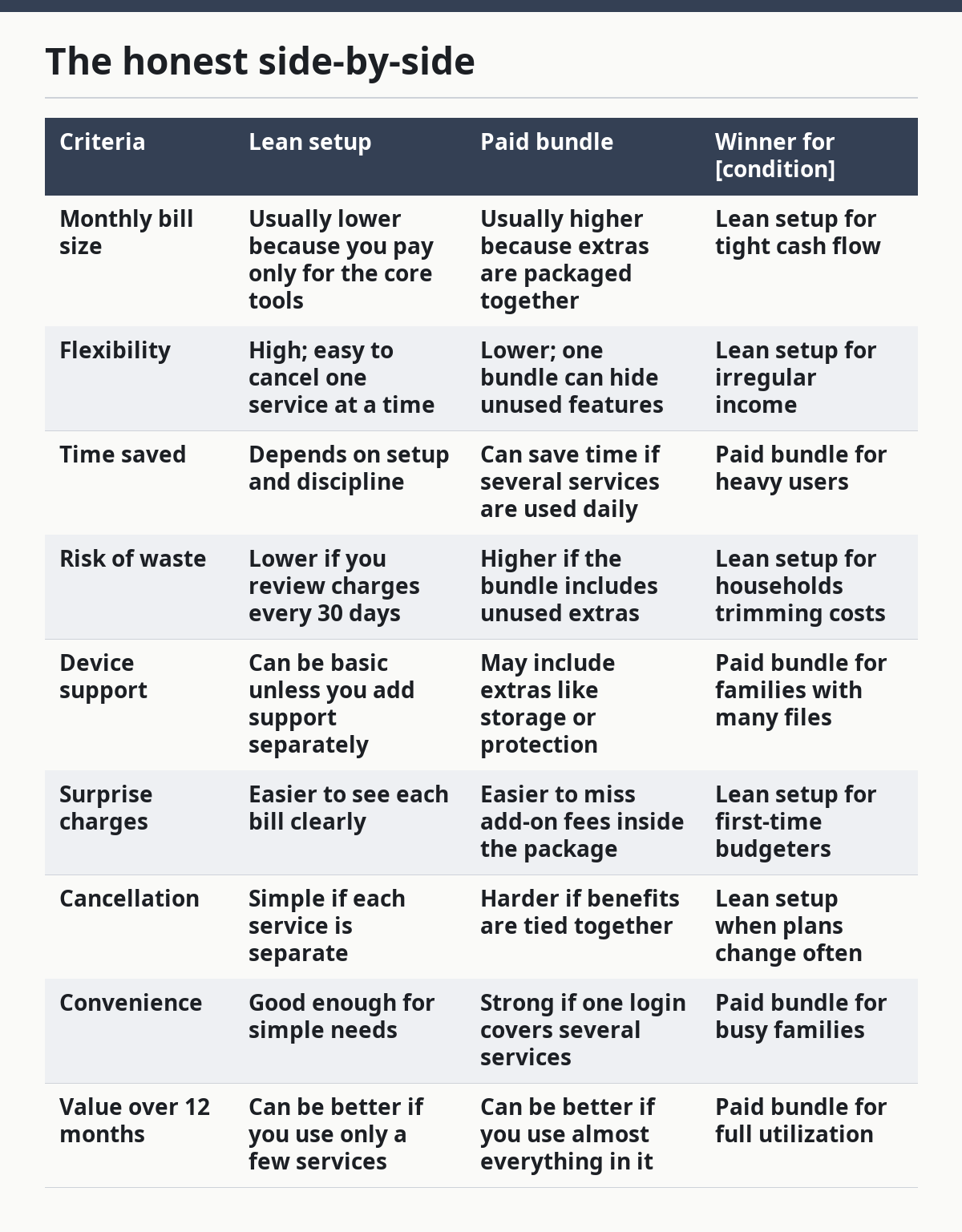
The table is not saying bundles are bad. It is saying bundles are dangerous when you do not use most of what you pay for. A bundle with 4 useful parts beats 4 separate bills. A bundle with 2 useful parts and 5 ignored extras is just a dressed-up leak.
The lean setup also has a weakness: it takes more attention. You have to review charges, remember renewal dates, and decide what stays. That extra work matters if your schedule is already packed. Still, for many single parents, the ability to cut one charge without breaking the whole setup is worth the effort.
When should you pay more without feeling guilty?
You should pay more when the higher cost protects time, sleep, or job stability. That is the clearest case for a better internet plan, a sturdier laptop, or a phone with a battery that lasts through the day.
A single parent who works from home or takes remote shifts may need faster service and stronger equipment than a parent who mainly uses text, email, and school portals. If a slower plan causes dropped calls, failed uploads, or repeated retries, the cheaper option is not cheap. It is expensive in stress.
This is also where a parent should ignore generic “save more” advice. Some cost increases are worth it because they reduce repeat problems. A $0.99 app is not worth much if it saves you 2 hours a month. A stronger plan that keeps a job task from failing can be the better buy even if it looks larger on paper.
A good way to decide is to link the upgrade to a concrete problem. Faster broadband may be worth it if multiple people are on video calls or homework sites at the same time. Extra cloud storage may be worth it if the phone fills up with school files and family photos before the month ends. Better battery life may be worth it if the phone is used away from home for 10 to 12 hours.
Do not pay more just because the higher tier sounds safer. Pay more only when the lower tier has already caused a real problem or clearly would cause one.
What should I cut first?
Cut the services that are easy to replace and rarely used first. That usually means duplicate streaming, premium app tiers, and storage plans that are larger than your actual need.
The next things to review are device protection add-ons and “free trial” charges that turned into monthly bills. Many households keep those charges out of habit, not because they still make sense. A 15-minute review once a month is often enough to find 1 or 2 charges that can go.
School and work tools come before entertainment. If the choice is between keeping the home internet and keeping three streaming apps, the answer is obvious. If the choice is between a phone plan with dependable service and a bundle of extras, the line should still favor the core service.
This does not mean every extra is bad. It means every extra needs a job. If a service has no job, or the job is tiny, it should not keep taking money every month. The same rule applies to digital storage, payment apps, and productivity tools.
A single-parent budget gets stronger when the cuts are quiet and repeated. Dropping one unused service is good. Dropping one unused service every month for 6 months is better.
What are the exception cases?
The general advice flips in 4 cases: heavy remote work, shared custody across households, a child with specialized school needs, and a household with almost no margin for device failure.
Heavy remote work changes the answer because speed and uptime matter more than cost alone. If your paycheck depends on stable video calls, uploads, or long online sessions, a stronger plan and better hardware can beat a cheaper setup.
Shared custody can change the service mix too. If children move between homes, cloud sharing, shared calendars, and messaging tools may be worth paying for because they reduce missed handoffs. The service cost can be lower than the cost of confusion.
Specialized school needs are another exception. If a child needs accessibility tools, repeated printing, large file access, or specialized apps, the “cheapest” option may not be usable. In that case, paying for the right software can save time and avoid school problems.
The last exception is fragility. If your current phone or laptop is so old that one failure would knock out work, school, and transportation at once, replace it before you chase small savings. A 1-week delay in replacement can cost more than a modest upgrade.
These exceptions matter because a good guide should say when it is wrong. A blanket “spend less” rule fails families whose devices do real work every day.
What would I choose for most single parents?
For most single parents, I would choose a lean setup with one solid device, one dependable phone plan, one internet plan, and only the subscriptions that prove their value every 30 days. That choice fits irregular income better because it gives you more control over the next bill.
Choose a paid bundle if the bundle clearly replaces separate bills you already use every month, especially when it saves time and reduces the chance of missed payments. Choose the lean setup if your income changes often, your needs shift month to month, or you are still trying to find where the money leaks.
Neither choice is right if the household is paying for convenience while the basics are unstable. If the phone is unreliable, the internet is spotty, or the device keeps failing, the problem is not the mix of extras. The problem is the core setup.
The hard truth is that digital services can act like hidden rent. The easiest way to keep them from taking over your budget is to review them on a fixed day each month and cut anything that is not earning its place.
What questions should I ask before I buy or renew?
Ask whether the service or device will still matter 6 months from now. Ask whether it replaces another bill, saves real time, or protects something expensive enough to justify the fee.
Also ask whether the household can absorb the cost if income dips for a week. That one question matters more than the sales pitch. A service that is fine in a good month may be too much in a bad one.
Ask how easy it is to cancel, move, or downgrade. A plan that looks affordable but is hard to change can trap you. The best digital cost is flexible enough to survive a school break, a job change, or a medical bill.
Finally, ask what happens if you say no. If the answer is “not much,” that service is probably optional. If the answer is “school gets harder,” “work gets slower,” or “the phone stops being reliable,” it belongs in the core budget.
Is this about being cheap or being strategic?
It is about being strategic. Cheap choices that fail create more stress than they save, especially when the device or service sits in the middle of school, work, and child care.
A strategic budget does not chase the lowest sticker price. It protects the things that keep the household running and cuts the things that only feel useful. That is a better fit for single parents than one-size-fits-all money advice, because it respects both the pressure of one income and the reality of daily logistics.
FAQ
How many digital subscriptions should a single parent keep?
Keep only the subscriptions that solve a repeat problem or save real time each month. A parent with irregular income should review every charge on a 30-day cycle and cancel anything that has no clear job. If a service is only “nice to have,” it should not outrank food, rent, phone service, or internet.
Is it better to pay monthly for a device or buy it outright?
Buying outright is usually easier to manage if you can afford the upfront cost without weakening the rest of the budget. Monthly payments spread the pain out, but they also add another fixed bill that keeps showing up after the device is already in use. If cash flow is tight, compare the total cost carefully and think about what happens if one payment is late.
Should I buy a cheap laptop for my child’s schoolwork?
Only if the schoolwork is light and the device can still handle updates, video calls, and file storage without constant trouble. A very cheap laptop can become expensive if it slows down, fails early, or cannot support the tools the school expects. For daily homework use, reliability usually matters more than a low starting price.
When does paid cloud storage make sense?
Paid cloud storage makes sense when you are running out of space, need backup for school or work files, or want easy access across more than one device. It does not make sense just because the upgrade is offered. If the household can clear space, move files, or use a free option without pain, the paid plan may be unnecessary.
What is the fastest way to cut digital costs this month?
Cancel duplicate subscriptions first, then review storage and app upgrades, then check whether your phone or internet plan still fits actual use. A 15-minute review can uncover charges that no one in the household depends on. If you only change one thing, cut the service that is renewing quietly and doing the least work.
Drafted with AI; not yet reviewed by a person.